Where to Find Your MLBB User ID and Zone ID: Step-by-Step Guide
Find your MLBB User ID and Zone ID on the profile screen, enter them correctly, and understand the irreversible risk of using a wrong ID.
 DostGame
2 min read
1,158 views
DostGame
2 min read
1,158 views
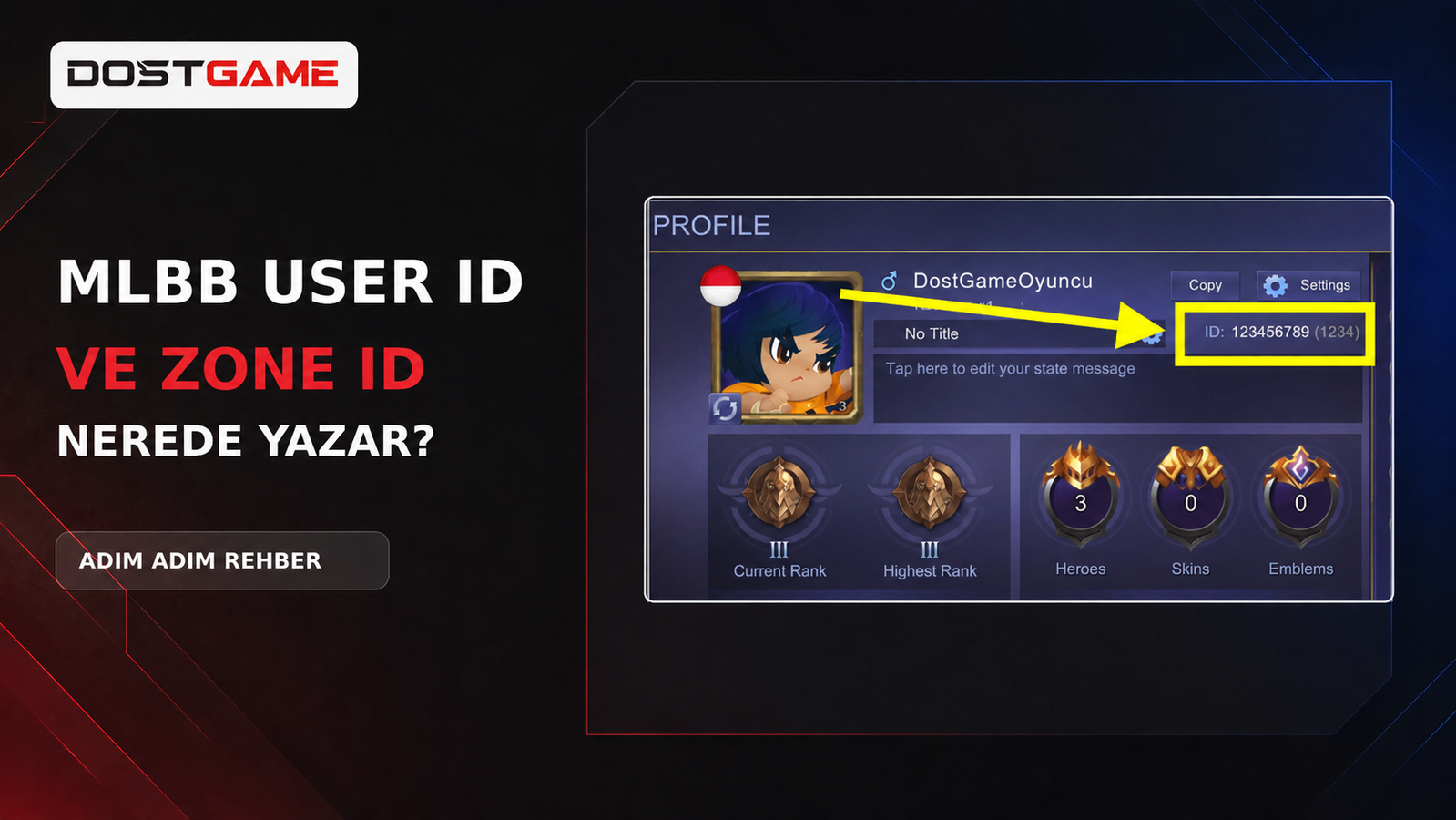
Quick answer: Open Mobile Legends: Bang Bang and tap your profile picture in the top-left corner. The main number shown near your name is your User ID; the number in parentheses is your Zone ID or Server ID. In 123456789 (1234), enter 123456789 as the User ID and 1234 as the Zone ID.
MLBB diamond top ups and passes use these two numbers, not your nickname. Compare both fields with the live profile screen before confirming payment.
How to find your MLBB User ID
- Open MLBB.
- Tap your avatar in the top-left corner.
- Open Profile or Basic Info.
- Find the numeric ID near your player name.
- Enter the number outside the parentheses as the User ID.
Where is the Zone ID?
The Zone ID distinguishes the game server or zone linked to the account. It normally appears beside the User ID in parentheses. Enter digits only—do not include brackets, spaces, dots or dashes.
| Shown in profile | Order field | Enter |
|---|---|---|
| 123456789 | User ID | 123456789 |
| (1234) | Zone ID | 1234 |
Is the player name the same as the User ID?
No. Your nickname can change and different players may use similar names. A top up must use the numeric User ID and Zone ID.
Checks before ordering
- Copy the IDs directly when possible.
- Do not swap the two fields.
- For gifts, verify the recipient’s own profile screen.
- Check whether the product supports the account’s Turkey or Global region.
Important: IDs identify the account but do not prove product-region compatibility. Follow the supported and excluded account regions stated on the product page.
What happens if the ID is wrong?
A top up sent to a wrong but valid account may be delivered to another player. Once a digital product is successfully delivered, it cannot be recalled, transferred, exchanged, refunded or compensated. This rule applies to every game delivered by player ID, not only MLBB.
If processing has not started, support may review the order. After completed delivery, it cannot be reversed. The final check before payment is the customer’s responsibility.
Do I need an MLBB password?
No. A standard ID top up only requires User ID and Zone ID. Never share your game or email password, OTP, social-login code or recovery code.
Turkey or Global?
After confirming the IDs, select a product compatible with the receiving account. Review MLBB Turkey or MLBB Global. “Global” does not mean guaranteed compatibility with every account.
Last reviewed: 16 August 2026. The interface may change; always verify the numbers in the current in-game profile.